Finding the right Prague public transport tickets comes down to understanding the golden rule: you pay for time, not for distance. Here is what you need to know:
- One ticket rules them all: There is no specific Prague bus ticket, tram ticket, or metro ticket.
- Total flexibility: A single ticket is valid for all types of Prague transport—including metros, trams, buses, and even PID trains within Prague.
- Hop on and off: You can switch between any of these transit methods as much as you like, as long as your prepaid time has not expired.
Important for 2026: Prague now charges different rates depending on how you buy your ticket. Purchasing your tickets digitally via the official app is cheaper than buying traditional paper tickets.
This guide breaks down the updated 2026 ticket types, exact prices for app vs. paper, and how to avoid the strict validation fines so you can navigate the city flawlessly.
Prague Public Transport Prices & Ticket Types
Prague uses a time-based ticket system. Here are the main ticket types available:
| Ticket Category | Validity | Type | Price (App/Electronic) | Price (Paper/SMS) |
| Short-term | 30 Minutes | Single Use | 36 CZK | 39 CZK / 42 CZK |
| Short-term | 90 Minutes | Single Use | 46 CZK | 50 CZK / 55 CZK |
| Short-term | 24 Hours | Single Use | 140 CZK | 150 CZK |
| Short-term | 72 Hours | Single Use | 340 CZK | 350 CZK |
| Long-term | 30 Days | Personal | 550 CZK | 550 CZK |
| Long-term | 30 Days | Anonymous | N/A | 1,000 CZK |
| Long-term | 90 Days | Personal | 1,480 CZK | 1,480 CZK |
| Long-term | 90 Days | Anonymous | N/A | 2,700 CZK |
| Long-term | 1 Year | Personal | 3,650 CZK | 3,650 CZK |
| Long-term | 1 Year | Anonymous | N/A | 7,800 CZK |
Short-Term Tickets (30 Minutes to 72 Hours)
These are the most common tickets for tourists visiting Prague.
- 30 minutes – for short trips
- 90 minutes – best for most travel
- 24 hours – unlimited travel for one day
- 72 hours – best for 2–3 days

Long-Term Commuter Passes (Monthly & Yearly)
This type more efficient if you are staying in Prague more than 10 days. The biggest advantage (my opinion) you don’t need to warry about a lot of things. Like if ticket still valid, if you stamp it. I am keeping my card-pass in the valet. If you prefer electronic variant, you only need to have your mobile charged.
- 30-day pass
- 90-day pass
- 1 year pass
These passes are Available as:
- Personal (with photo and name)
- Anonymous (transferable)
👉The same tickets—both short and long-term—are valid for Prague’s night transport.
Short-Term Prague Public Transport Tickets: Prices
Exist a three versions of short-term Prague public transport tickets:
- paper
- electronic/digital
- SMS
ℹ️ SMS tickets are only available for Czech phone numbers so, for tourists it is not an option.
The 2026 tariff emphasizes a “digital-first” approach. Buying through the PID Lítačka app is now the cheapest way to travel. The price difference is around 8%. In the table below you can see the current prices for Prague public transport tickets.
| Ticket Type | App Price | Paper | SMS |
|---|---|---|---|
| 30 min | 36 CZK | 39 CZK | 42 CZK |
| 90 min | 46 CZK | 50 CZK | 55 CZK |
| 24h | 140 CZK | 150 CZK | 150 CZK |
| 72h | 340 CZK | 350 CZK | 350 CZK |
👉Longer tickets are usually cheaper per hour, but the best choice depends on how often you travel.
Want to use the Prague public transport without mistakes? Read this article “How to Use Prague Public Transport: Tips and Secrets“
Long-Term Passes
If you are staying in Prague for 10 days or longer, stop buying daily tickets. Get a 30-day pass instead.
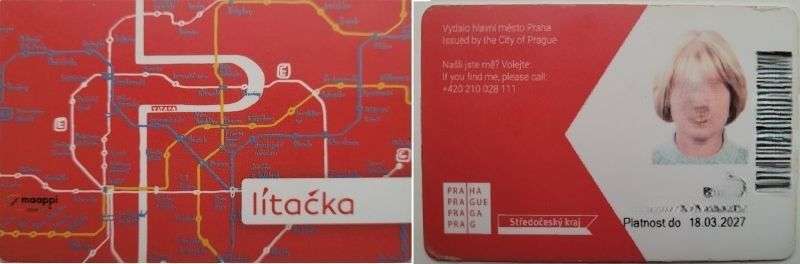
| Pass Type | Price (30 Days) | Best For | Requirement |
| Personal (Non-Transferable) | 550 CZK | Budget travelers | Online registration + Photo |
| Transferable (Anonymous) | 1,000 CZK | Convenience / Sharing | No registration needed |
How to get the discounted 550 CZK monthly price
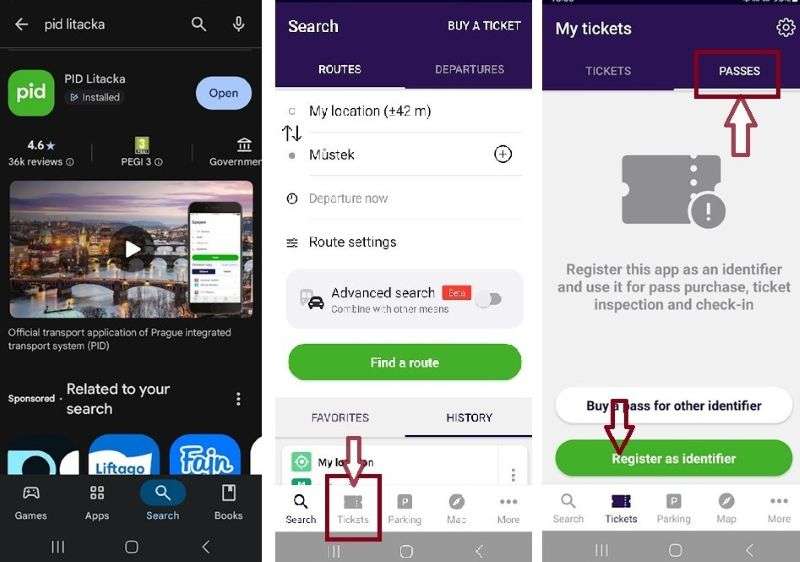
- Download the PID Lítačka app.
- Register and upload a digital photo (headshot).
- Once verified, buy the “Prague (P,0,B)” coupon in the app.
- Your phone is now your pass. No physical card is required.
Which ticket option should you choose?
| Stay Duration | Cost using 24-Hour or 72-Hour Tickets (App) | 30-Day Anonymous Pass | 30-Day Personal Pass | Your Best Move |
| 1–4 Days | 340+ CZK | 1,000 CZK | 550 CZK | Use 24h or 72h App tickets. |
| 5–8 Days | 620+ CZK | 1,000 CZK | 550 CZK | Personal 30-day is already cheaper! |
| 9+ Days | 1,020+ CZK | 1,000 CZK | 550 CZK | Even Anonymous 30-day is now cheaper. |
- For the “Lazy” Tourist (Stay: 9+ days): Buy the 1,000 CZK Anonymous Pass. You can get it as a paper ticket at the Airport or any Metro Info Center. No photos, no registration, no apps. Just buy it and forget about tickets for a month. You can even give it to a friend when you leave.
- For the “Budget” Backpacker (Stay: 5+ days): Spend 10 minutes on the PID Lítačka app. Upload a selfie, register your ID, and buy the 550 CZK Personal Pass. It pays for itself in just 4 days compared to buying daily tickets.
- For the “Weekend” Visitor (Stay: 1–3 days): Stick to the PID Lítačka app for single 36 CZK or 24-hour 140 CZK tickets. It’s cheaper than the paper machines (which charge 39 CZK / 150 CZK).
👉 If you are arriving at Prague Airport, it is useful to know how to get to the city center by public transport.
Where to Buy Your Prague Transit Tickets
Using the PID Lítačka App (Cheapest & Easiest)
This is a great, modern and the cheapest option if you are comfortable using apps.
If you like apps, this is one of the easiest ways to get tickets:
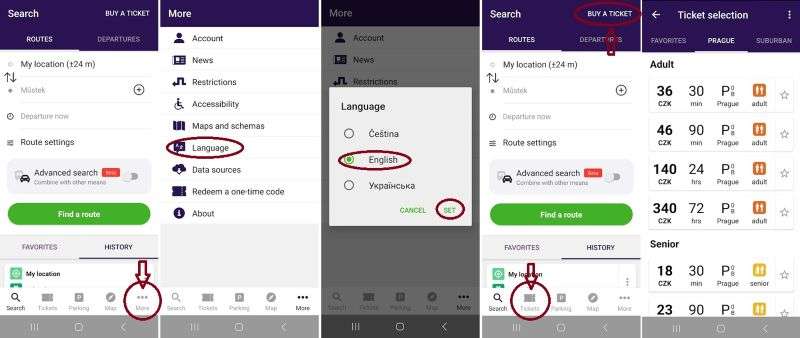
- Download the PID Lítačka app (iOS or Android).
- Change the language (Jazyk)
- Tap “Bye a Ticket” on the top of screen, or “Tickets” on the bottomn.
- Choose the type of ticket you want (30 min, 90 min, 24 hours, etc.).
- Important: you also need to choose when to validate the ticket. Options include:
- Immediately – your paid time starts as soon as you activate it.
- At a certain time – you can schedule the start for later.
- With additional actions – for example, connecting tickets or special options for certain transport lines.
- Activate it before travel – the QR code on your phone screen is your valid ticket.
💡 My personal tip: I usually activate tickets immediately when I’m ready to board. It’s simple and I never worry about forgetting. But if you’re planning ahead, scheduling the ticket for later can save a bit of stress.
At Metro Stations & Stops (Ticket Machines)
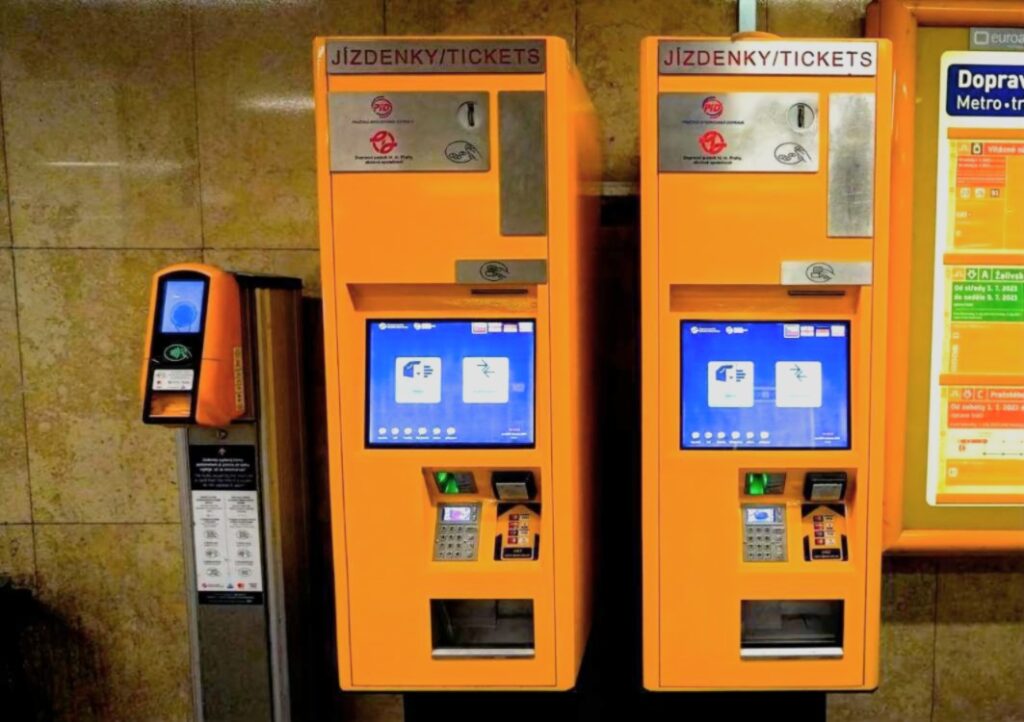
These are the large yellow boxes. You will see them at every metro station and many tram/bus stops.
Modern Touch-Screen vs. Old Push-Button Machines
These machines are easy to use. You can pay by card or with Czech coins.
- Choose Your Language: Look for the language icon (usually in the top right corner). Tap it and select your language from the menu.
- Make Your Selection: Choose the ticket type (30 minutes, 90 minutes, 24 hours, or 72 hours). Then select the number of tickets and any discount (if you qualify). You can also choose to print a receipt.
- Pay: Insert coins or use your payment card.
- Take Your Tickets: Wait a few seconds. The machine will print your tickets and drop them into the collection slot at the bottom.
Did you know you can explore Prague by tram? You’ll find everything you need, including tram numbers and route maps, in my article: “Cheap Prague Sightseeing by Tram: Best Routes & Tips“.
These are older and less common old-style ticket vending machine, mostly found at non-central stops. They are simple but have limitations: Payment – Coins only.
How it work: the machine has buttons marked with the ticket type and cost.
- Press the button and put in the coins.
- The machine will print your ticket.
❗ IMPORTANT: Tickets from these machines are NOT validated. You must put your new Prague Public Transport Tickets into a small yellow validator machine before you travel.
Yellow Card-Only Validators Inside Trams & Buses
These small machines are inside buses, trams, and trolleybuses. You can also find them next to other machines in the metro.
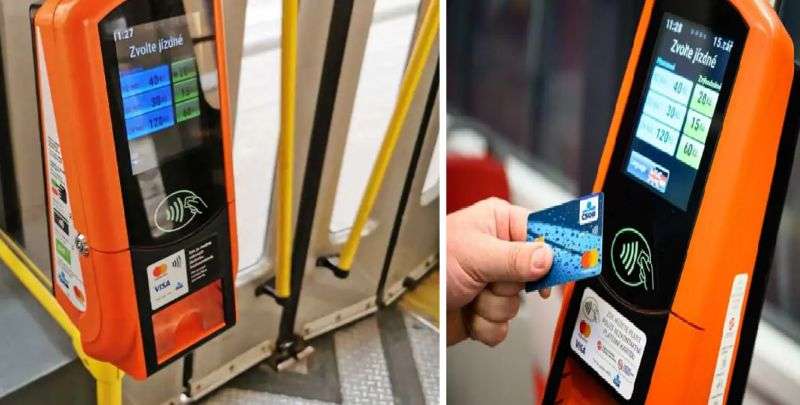
- Payment: Card only.
- These tickets come already validated. The paid time starts counting immediately when you buy them.
👉 Be Careful: If you buy this ticket “just in case” for later, the time is already running out. Only buy this type of ticket right before you travel.
You are not sure how to use Prague metro? This article could help you to be more confident: “How to Use Prague Metro: Navigation and Rules“
In-Person (Trafika Kiosks & Info Centers)
If you prefer not to use machines or mobile apps, you can buy physical paper tickets from real people at various points across the city.
- Trafika Kiosks (Tabák): These are local newsagents, convenience shops, and tobacco kiosks found on street corners, inside metro vestibules, and near major transit hubs. Look for signs that say Tabák or Trafika. Just walk up to the counter and ask for the ticket duration you need (e.g., “Two 30-minute tickets, please”).
- DPP Information Centers: The official Prague Transit Company (DPP) runs dedicated information desks at Prague Airport (Terminals 1 and 2) and inside major metro stations like Hlavní nádraží (Main Railway Station), Můstek, and Muzeum. The staff speak English and can help you select the right ticket.
Keep in mind for 2026: Buying paper tickets in person means you will pay the higher paper tariff rate (e.g., 39 CZK for a 30-minute ticket instead of the 36 CZK app price). Additionally, these tickets are not activated upon purchase—you must validate them manually in the yellow machines the
How to Validate Your Ticket (And Avoid Steep Fines)
In Prague, buying a ticket is not enough — you must also validate it before you start your journey. Validation means activating your ticket so that the system (and inspectors) knows when your travel time begins.
Prague Public Transport Tickets Validation Rules
- Always validate your ticket before boarding. Do not wait until inspection — it’s too late
- Make sure the time stamp is clearly printed on paper tickets
- Leave the vehicle/metro station prepaid area before your ticket expires
How and when to validate paper vs. app tickets
- Paper tickets:
Insert the ticket into a small yellow validation machine when you enter the metro, tram, or bus. The machine will print the date and time on the ticket. - Mobile app tickets (PID Lítačka):
You must manually activate the ticket in the app before travel. Be careful. The timer don’t starts immediately after activation. You need to activate a ticket one minutes before boarding. - Tickets bought inside vehicles (card machines):
These are automatically validated at the moment of purchase.
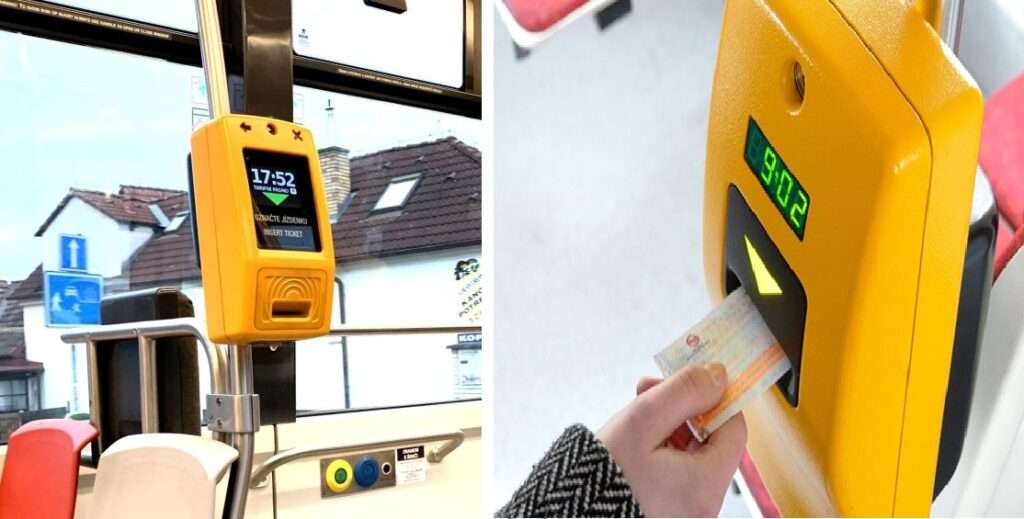
Validators for paper tickets look like small yellow boxes with a screen showing the time and a slot for the ticket. Look for the orange arrow on your ticket; insert it into the slot and wait for the stamp to be printed (you will hear a distinct printing sound). From this moment, your ticket is valid and the countdown has started
What happens if you get caught without a valid ticket?
👉 Your ticket is not valid without validation, even if you already paid for it. Ticket inspectors regularly check passengers, and fines are common.
- If your ticket is not validated → you can get a fine of up to 2,000 CZK
- Inspectors do not accept excuses like “I didn’t know”
All information about fines in Prague you could find in my article “Fine for Travelling Without a Ticket in Prague: Better No”
Frequently Asked Questions (FAQ)
Is the Petřín Funicular included? Only on 24-hour, 72-hour tickets, and Monthly passes. If you have a 30-minute or 90-minute ticket, you must buy a separate ticket at the funicular station.
Can I use one ticket for two people? No. Every passenger must have their own valid ticket or app activation. The only exception is the 1,000 CZK Transferable Pass, but even then, it only covers one person at a time.
Should I pay for luggage in Prague public transport? If your luggage or an animal in a carrier is smaller than 25 × 45 × 70 cm, you do not need to pay. If it is bigger (even if only one dimension is larger), you need to buy an extra ticket. The price is 25 CZK for a paper ticket and 23 CZK for an electronic ticket through the PID Lítačka app.
Do you need to validate Prague transport tickets?
Yes. Paper tickets must be validated in a machine, and mobile tickets must be activated in the app before travel.
Could be helpful for tourists: “How to Read Prague timetables for Trams and Buses”
Final Travel Tips for Prague Public Transport Tickets
- Buying in Advance: If you want several tickets for later, use the modern touch-screen or old push-button machines. They print non-validated Prague public transport tickets that you can keep in your pocket. Validate them one by one right before you board.
- On the Spot: If you are already inside the bus or tram without a ticket, the small, self-service machine (card-only) is your best choice.
- Personal Preference: The modern touch-screen machines at the metro are often the best choice. They accept cards, offer all ticket types, and the tickets are not yet validated, so you can save them for later.
Useful Links & Resources
- Official Timetables: Plan your transit routes and check live schedules using the official PID
- PID Route Planner. (Note: You need to search using exact Czech stop names, like “Letiště” for the airport).

